





















citiusKBE Yandex search console

Knowledge Based Engineering Solutions with Ease of Use.

Contact Us
Contact Us 24/7
Contact Us
CitiusKBE
CitiusKBE

ClearCheck Pro - Interference & Clearance Validation

Automated Assembly Interference & Clearance Validation Tool

Eliminate manual guesswork and speed up your design

ClearCheck Pro – Fast, Reliable Interference and Clearance Checking in Assemblies

Interference and clearance validation are among the most critical yet time-consuming stages in product assembly design. A single unnoticed clash can result in assembly rework, production halts, or even product failure.

ClearCheck Pro brings automation, precision, and speed to this process. It’s an advanced CAD-integrated validation solution that automatically identifies, visualizes, and documents interferences, clearances, and collisions across complex assemblies. Supporting both static and dynamic analyses, the tool checks for component overlaps, minimum clearance violations, and movement-based collisions while allowing full customization of clearance thresholds.

Compatible with Siemens NX, Solid Edge, and Autodesk Inventor, ClearCheck Pro works seamlessly with both native and imported geometry, ensuring complete assembly coverage from concept to production release.

ClearCheck Pro - A designer friendly tool to check interference and clearances in the assemblies.
1 %
less time spent on manual clearance validation.
1 %
visibility into interference and dynamic clearance conditions.
1 %
reduction in rework caused by late-stage assembly conflicts.
1 X
faster design verification across multi-component assemblies.

Why Choose ClearCheck Pro?

ClearCheck Pro is designed for design and manufacturing teams who need to guarantee flawless fit, tolerance, and assembly performance across multi-part systems. The software intelligently detects geometric overlaps, clearance violations, and collision paths, providing immediate visual and tabular results within your CAD environment. It combines static interference analysis (to find overlapping geometry) with dynamic clearance and collision detection, capturing issues that only appear during component movement or articulation. By offering configurable thresholds, standard part exclusion, and dynamic simulation, ClearCheck Pro ensures every assembly meets your company’s mechanical, spatial, and safety standards  before production begins.

CitiusKBE delivers advanced CAD automation tools and engineering productivity solutions

Static Interference Detection

Identifies and highlights overlapping geometry between assembly components. Displays the precise location, volume, and affected components for fast correction.
CitiusKBE delivers advanced CAD automation tools and engineering productivity solutions

Dynamic Clearance Measurement

Measures real-time minimum clearances between moving or rotating parts during motion simulations, ensuring proper fit under operating conditions.

CitiusKBE delivers advanced CAD automation tools and engineering productivity solutions

Collision Detection

Automatically detects when components come into contact or violate clearance thresholds during movement, preventing assembly or functional issues.

CitiusKBE delivers advanced CAD automation tools and engineering productivity solutions

Custom Thresholds

Allows engineers to define minimum and maximum clearance values to match company, customer, or industry standards.

CitiusKBE delivers advanced CAD automation tools and engineering productivity solutions

Ignore Standard & Brought-Out Parts

Exclude fasteners, washers, or other standard parts from analysis to eliminate false positives and focus on critical design areas.

CitiusKBE delivers advanced CAD automation tools and engineering productivity solutions

Support for Imported Geometry

Analyze mixed assemblies that include imported models from other CAD platforms or legacy systems without compatibility issues.

CitiusKBE delivers advanced CAD automation tools and engineering productivity solutions

Detailed Reporting

Generates comprehensive, exportable reports summarizing interferences, clearance values, and affected components for documentation, QA, or supplier review.
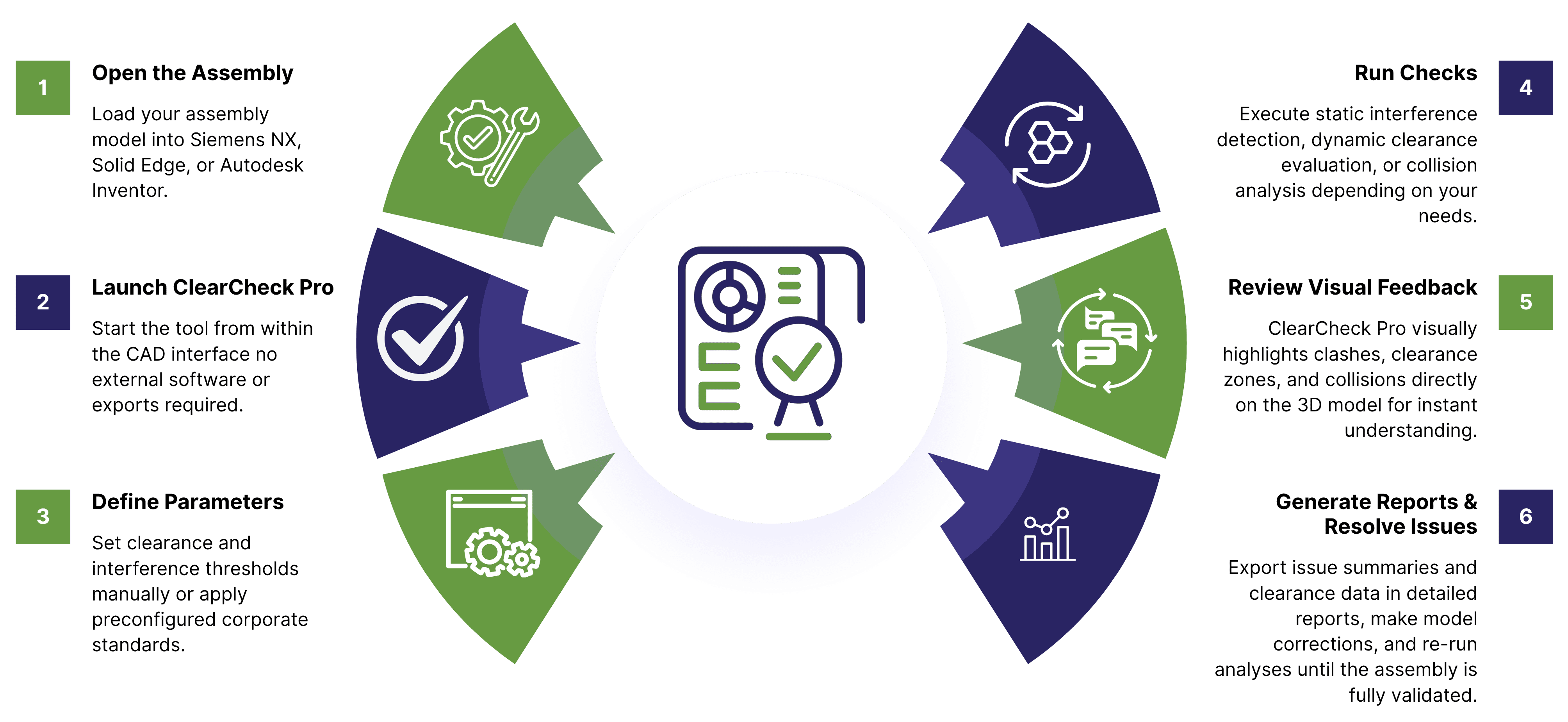

ClearCheck Pro Working Process

🚀 Workflow

How It Works

1. Open the Assembly

Load your assembly model into Siemens NX, Solid Edge, or Autodesk Inventor.

2. Launch ClearCheck Pro

Start the tool from within the CAD interface no external software or exports required.

3. Define Parameters

Set clearance and interference thresholds manually or apply preconfigured corporate standards.

4. Run Checks

Execute static interference detection, dynamic clearance evaluation, or collision analysis depending on your needs.

5. Review Visual Feedback

ClearCheck Pro visually highlights clashes, clearance zones, and collisions directly on the 3D model for instant understanding.

6. Generate Reports & Resolve Issues

Export issue summaries and clearance data in detailed reports, make model corrections, and re-run analyses until the assembly is fully validated.

Why ClearCheck Pro

ClearCheck Pro transforms traditional interference and clearance validation into an automated, repeatable, and reliable process. By combining dynamic clearance analysis, collision detection, and static interference checking within one unified environment, it empowers engineering teams to catch and correct issues early saving significant time and cost. It’s more than a checking tool it’s a fit-and-function assurance system that ensures your assemblies are accurate, interference-free, and ready for real-world performance.

💡 Key Details

Combines interference, clearance, and collision analysis in one integrated workflow.

Supports both native and imported CAD geometry.

Customizable thresholds for flexible validation standards.

Batch-capable for large or legacy assembly projects.

Generates ready-to-share visual and tabular reports.

Enhances cross-team collaboration and design accuracy.

🏭 Industries Benefiting

Automotive & Heavy Vehicle Manufacturing

for multi-component assemblies and moving parts validation.

Aerospace & Defense Engineering

for safety-critical fitment verification.

Industrial Machinery & Equipment Design

for tolerance and clearance accuracy.

Consumer Electronics & Appliance Assembly

for tight packaging and fit constraints.

Medical Devices & Healthcare Equipment

for precise multi-part component integration.

Energy & Utilities Equipment Manufacturing

for large-scale mechanical system validation.

ClearCheck Pro - Clash detection and clearance scanning tool citiusKBE

🌟 Use Cases of ClearCheck Pro

👉 Detect Every Interference Before It Reaches the Production Floor

Don’t let clearance issues slow down your projects. Automate detection, analyze collisions dynamically, and validate assemblies confidently with ClearCheck Pro your all-in-one interference and clearance checking solution.

Frequently Asked Questions (FAQs)

Which CAD systems does ClearCheck Pro support?
Siemens NX, Solid Edge, and Autodesk Inventor, with the ability to analyze imported geometry from other CAD platforms.
Can I customize clearance and interference thresholds?
Yes, thresholds can be fully defined per project or aligned with corporate standards.
Can standard parts be excluded from checks?
Yes, you can exclude fasteners and other standard or brought-out components to focus only on key areas.
How does dynamic clearance differ from interference detection?
Dynamic clearance measures the minimum distance between moving parts, while interference detection identifies static overlapping geometry.
Can ClearCheck Pro handle large assemblies?
Absolutely the tool is optimized to manage complex assemblies containing thousands of components efficiently.
Toolkit Solutions

Explore real-world Toolkit Solutions showcasing how NX CAD Tools deliver automated precision validation, streamline workflows, and enhance engineering outcomes with unmatched efficiency

GET A FREE TRAIL VERSION

ClearCheck Pro

ClearCheck Pro - A designer friendly tool to check interference and clearances in the assemblies.

ClearCheck Pro – Fast, Reliable Interference and Clearance Checking in Assemblies

Cart (0 items)
citiusKBE - Smart CAD Automation Solutions & Plugins

Please fill this form to get a quick callback...

citiusKBE - Smart CAD Automation Solutions & Plugins

Apply for a Position

Take the next step in your career apply now and grow with CitiusKBE.

Upload your CV with supporting docs