

















citiusKBE Yandex search console

Knowledge Based Engineering Solutions with Ease of Use.

Contact Us
Contact Us 24/7
Contact Us
CitiusKBE
CitiusKBE

StandardMate NX - CAD Standards Automation

CAD standards automation tool that enforces modelling discipline by applying company and customer standards directly during design creation.

90% less manual effort spent on standards verification

StandardMate NX – Enforce Standards. Ensure Quality. Every NX Assembly.

Every successful engineering organization runs on one foundation consistency.
Yet, as teams grow and projects expand, maintaining design and documentation standards becomes a constant challenge.

StandardMate NX brings discipline and quality control into your Siemens NX environment by automating company and customer standards across modeling and drafting processes.

With rule-based enforcement, live validation, and corrective feedback, it ensures every assembly, model, and drawing meets internal guidelines and customer requirements first time, every time.

StandardMate NX – Enforce Standards. Ensure Quality. Every NX Assembly.
1 %
Less manual effort spent on standards verification.
1 %
Consistency across assemblies and drawings.
1 %
reduction in design review and QA correction cycles.
1 X
faster onboarding for new engineers with guided feedback.

Why Choose StandardMate NX

StandardMate NX is a standards enforcement and compliance automation tool built exclusively for Siemens NX.
It enables teams to define, validate, and apply corporate or customer-specific CAD standards automatically  minimizing human errors and eliminating standards drift. From layer organization and naming conventions to constraints, arrangements, and annotations, the tool continuously validates every NX model and drawing against your defined rules. With real-time alerts, batch compliance checking, and auto-correction options, StandardMate NX ensures every deliverable remains compliant, professional, and production-ready.

CitiusKBE delivers advanced CAD automation tools and engineering productivity solutions

Assembly Compliance Engine

Checks, applies, and enforces layer, arrangement, and constraint standards across complex, multi-level assemblies maintaining structure and consistency throughout your projects.
CitiusKBE delivers advanced CAD automation tools and engineering productivity solutions

Automated Validation & Corrections

Automatically flags missing properties, suppressed constraints, hidden components, or non-conforming features, enabling instant resolution and fewer review loops.
CitiusKBE delivers advanced CAD automation tools and engineering productivity solutions

Configurable Standards Library

Supports multiple standards profiles (internal, customer-specific, or regulatory) that can be easily updated or customized for each project or product line.
CitiusKBE delivers advanced CAD automation tools and engineering productivity solutions

Real-Time Feedback

Delivers proactive alerts and correction guidance directly as you model, helping teams correct issues immediately instead of after reviews.
CitiusKBE delivers advanced CAD automation tools and engineering productivity solutions

Batch Project Checks

Perform large-scale compliance validation across entire project folders or legacy data, standardizing outputs in one operation.

Automating report generation

Audit & QA Reporting

Generate exportable compliance reports for internal audits, process documentation, or customer review packages.
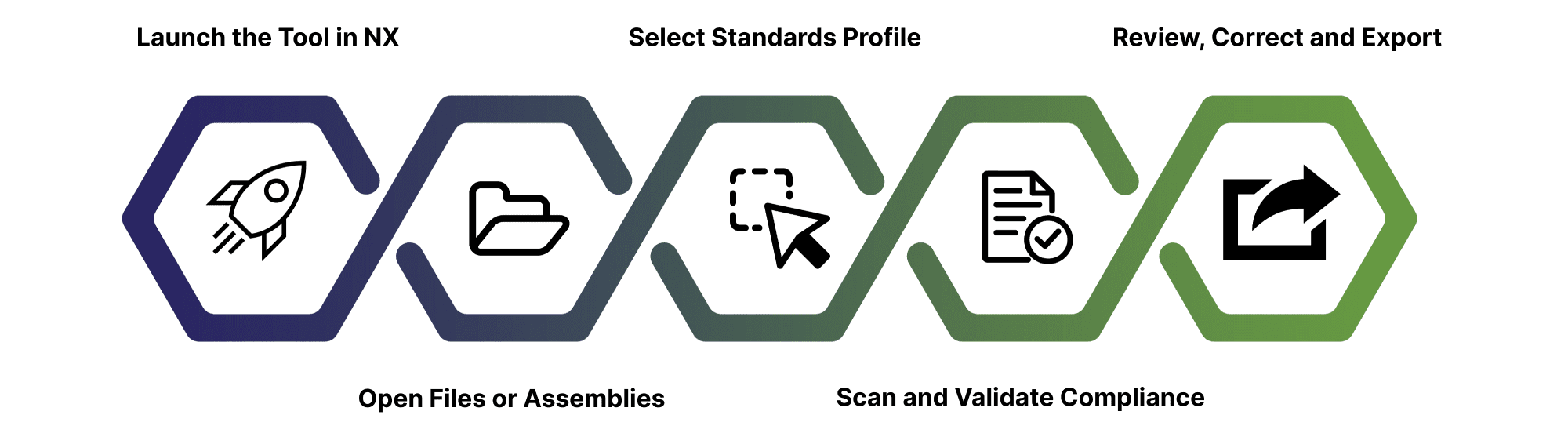
StandardMate NX Tool Working Process

CitiusKBE delivers advanced CAD automation tools and engineering productivity solutions
🚀 Workflow

How It Works

1. Launch StandardMate NX from your Siemens NX environment

Access StandardMate NX as a native plugin within NX no additional setup or external software required.

2. Open the assembly, drawing, or batch of files

Select individual or multiple NX files you wish to validate. The tool supports multi-level assemblies and complete project directories.

3. Choose your standards profile

Pick from predefined company, customer, or project-specific standards. These profiles dictate the rules for layer usage, constraints, properties, and annotations.

4. Auto-scan and validate compliance

StandardMate NX scans each file, comparing it against the selected standard set. It highlights issues related to layers, constraints, arrangements, attributes, and annotation formatting.

5. Review, correct, and export results

Instantly apply auto-corrections or approve suggested fixes. Generate compliance reports that summarize all checks, resolutions, and any remaining items for review.

Value Proposition

Eliminate Standards Drift

Say goodbye to manual checking and inconsistency. StandardMate NX ensures every model and drawing follows company or customer rules automatically.

Accelerate Quality Reviews
Catch and correct standards violations during design, not after release, cutting QA time and reducing rework cycles.
Onboard with Confidence
New engineers can instantly learn your company’s standards through guided alerts and built-in correction prompts reducing training overhead.
Future-Proof Design
Ensure every NX file is audit-ready, compliant, and easily shareable with customers, suppliers, or certification bodies.
StandardMate NX for CAD Standards Automation by citiusKBE

🌟 Use Cases of StandardMate NX

👉 Ready to Eliminate Standards Errors and Enforce Quality in NX?

Bring automation, accuracy, and accountability into your NX workflows. StandardMate NX empowers teams to design confidently, maintain standards automatically, and deliver compliant results every time.

Frequently Asked Questions (FAQs)

Which versions of Siemens NX are supported by StandardMate NX?
StandardMate NX supports all current Siemens NX versions and is regularly updated to align with new releases and patches.
Can StandardMate NX be customized for our internal or customer standards?
Absolutely. It supports configurable standards libraries, allowing you to define rules, templates, naming conventions, and annotations specific to your requirements.
Does it automatically fix issues or only flag them?
Both. StandardMate NX flags compliance issues in real-time or batch mode and can apply automated corrections when appropriate.
Can I check multiple assembly files or legacy projects at once?
Yes. The batch compliance feature scans and updates multiple NX files simultaneously, saving significant review time.
How does StandardMate NX help train new users?
It provides real-time prompts and guided correction suggestions, helping new engineers quickly learn and follow company standards.
Does StandardMate NX generate compliance reports for audits?
Yes. It produces detailed, exportable reports documenting each check and resolution, ideal for internal QA and customer audits.
Will it interfere with existing NX workflows?
No. As a native NX add-on, StandardMate NX integrates seamlessly into your current workflows—enhancing them without disruption.
Toolkit Solutions

Explore real-world Toolkit Solutions showcasing how NX CAD Tools deliver automated precision validation, streamline workflows, and enhance engineering outcomes with unmatched efficiency

GET A FREE TRAIL VERSION

StandardMate NX

StandardMate NX – Enforce Standards. Ensure Quality. Every NX Assembly.

StandardMate NX – Enforce Standards. Ensure Quality. Every NX Assembly.

StandardMate NX brings discipline and quality control into your Siemens NX environment by automating company and customer standards across modeling and drafting processes.

Cart (0 items)
citiusKBE - Smart CAD Automation Solutions & Plugins

Please fill this form to get a quick callback...

citiusKBE - Smart CAD Automation Solutions & Plugins

Apply for a Position

Take the next step in your career apply now and grow with CitiusKBE.

Upload your CV with supporting docs