



























citiusKBE Yandex search console

Knowledge Based Engineering Solutions with Ease of Use.

Contact Us
Contact Us 24/7
Contact Us
CitiusKBE
CitiusKBE

ImportFix CAD - Geometry Cleanup

Advanced Cleanup Solution for Imported Solid Geometry

clean and prepare imported solid geometry

ImportFix CAD – Clean, Prepare, and Optimize Imported Geometry for Seamless CAD Integration

When working with legacy data, supplier models, or neutral file formats, imported geometry often arrives with inconsistencies, unnecessary blends, and features that make editing nearly impossible. Manual cleanup is time-consuming, error-prone, and can easily disrupt model integrity.

ImportFix CAD solves this problem by automating the cleanup of imported solids, intelligently removing unwanted blends, fillets, chamfers, and closed holes without damaging the original geometry. It enables designers to quickly generate clean guide and reference curves, preparing models for parametric feature creation and downstream design tasks.

Fully integrated with Siemens NX, Solid Edge, and Autodesk Inventor, ImportFix CAD transforms unusable imported solids into clean, editable, and fully reusable geometry for modern CAD workflows.

ImportFix CAD – Advanced Cleanup Solution for Imported Solid Geometry
1 %
less manual cleanup time compared to traditional editing methods.
1 %
compatibility with Siemens NX, Solid Edge, and Autodesk Inventor workflows.
1 %
faster transition from imported geometry to parametric models.
1 X
Zero geometry loss maintains model integrity throughout cleanup.

Why Choose ImportFix CAD?

ImportFix CAD is an intelligent CAD cleanup automation tool that streamlines the process of converting imported or third-party solid models into editable, parametric-ready geometry. The tool automatically identifies and removes unnecessary features such as radius blends, chamfers, fillets, and filled holes, while preserving key design surfaces and boundary integrity. This ensures that engineers can extract accurate reference curves, rebuild parametric features efficiently, and reuse supplier or legacy data without starting from scratch. By minimizing manual rework, ImportFix CAD reduces design cycle time, improves CAD data quality, and enhances productivity across your engineering team.

CitiusKBE delivers advanced CAD automation tools and engineering productivity solutions

Automatic Detection & Removal

Automatically identifies and deletes unwanted blends, chamfers, fillets, and closed holes, providing a clean foundation for modeling.
CitiusKBE delivers advanced CAD automation tools and engineering productivity solutions

Guide Curve & Reference Creation

Generates precise curves from cleaned geometry, enabling reliable parametric modeling and feature rebuilding.

CitiusKBE delivers advanced CAD automation tools and engineering productivity solutions

Batch Processing

Handles large datasets efficiently by processing multiple files or assemblies in a single operation.

CitiusKBE delivers advanced CAD automation tools and engineering productivity solutions

Customizable Cleanup Filters

Gives users full control to retain or remove specific features based on project or design needs.
CitiusKBE delivers advanced CAD automation tools and engineering productivity solutions

Seamless CAD Integration

Works directly within Siemens NX, Solid Edge, and Autodesk Inventor environments for a smooth, consistent workflow.

CitiusKBE delivers advanced CAD automation tools and engineering productivity solutions

Geometry Preservation

Cleans geometry without altering key dimensions or structural surfaces, ensuring model accuracy is fully retained.
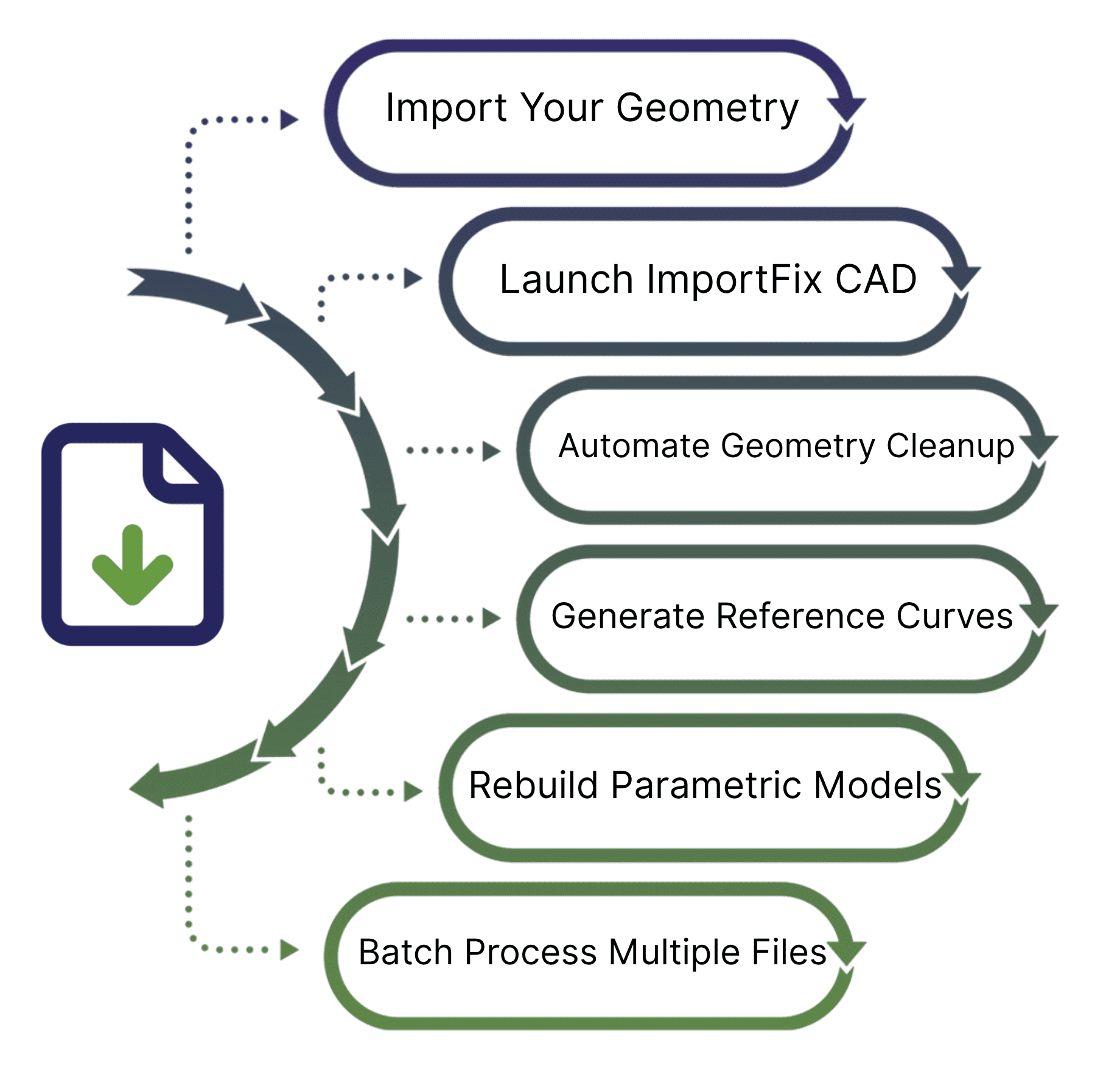
ImportFix CAD Tool Working Process

CitiusKBE delivers advanced CAD automation tools and engineering productivity solutions
🚀 Workflow

How It Works

1. Import Geometry

Load your legacy, supplier, or neutral format solid geometry (e.g., STEP, IGES, Parasolid) into your preferred CAD platform.

2. Run ImportFix CAD

Initiate the tool directly from your CAD environment. It scans the imported model to identify blends, chamfers, fillets, and closed holes.

3. Clean the Geometry

ImportFix CAD automatically removes unwanted features and fills the affected surfaces smoothly, ensuring continuity and accuracy.

4. Generate Guide & Reference Curves

Once cleanup is complete, the tool creates optimized guide and reference curves to support fully parametric feature building.

5. Build Parametric Models

Use the cleaned and simplified solid as a base to create parametric designs quickly and reliably—free from geometry issues.

6. Batch Processing

Process multiple files or assemblies simultaneously, ideal for large-scale cleanup of legacy or supplier-provided models.

Why ImportFix CAD

ImportFix CAD eliminates one of the most tedious stages of CAD data preparation manual model cleanup.
It enables engineering teams to work faster and smarter by automating the removal of obstructive features that block parametric modeling and reuse. Whether dealing with legacy archives, supplier models, or merged geometry, ImportFix CAD ensures you start every design from a clean, accurate foundation. By unlocking the true potential of imported solids, it helps organizations reduce rework, speed up design cycles, and improve collaboration across engineering and manufacturing teams.

💡 Designer Benefits

Reduce manual cleanup work

eliminate repetitive model editing

Maximize reuse

of imported or vendor-supplied geometry without remodeling.

Enhance design robustness

with clean base geometry ideal for parametric features.

Speed up the transition

from legacy or dump data to fully editable CAD models.

Improve collaboration

by standardizing imported data quality across design teams.

🏭 Industries Benefiting

Automotive & Aerospace Engineering

for supplier part reuse and design optimization.

Industrial Machinery & Equipment Manufacturing

for legacy data migration and model standardization.

Consumer Product & Electronics Design

for rapid modification of imported models.

Medical Device & Precision Engineering

for geometry accuracy and compliance readiness.

ImportFix CAD - Geometry cleanup tool from citiusKBE

🌟 Use Cases of ImportFix CAD

👉 Transform Imported Geometry into Design-Ready Models with ImportFix CAD

Don’t waste hours fixing imported geometry manually. Automate cleanup, protect geometry accuracy, and speed up your design process. With ImportFix CAD, your legacy and supplier models become clean, editable, and production-ready in minutes.

Frequently Asked Questions (FAQs)

Which CAD systems are supported by ImportFix CAD?
Siemens NX, Solid Edge, and Autodesk Inventor are currently supported, with more platforms in development.
Can I control which features are removed?
Yes, you can define custom filters to selectively retain or remove features such as fillets, blends, or holes based on your design requirements.
Does ImportFix CAD support batch processing?
Absolutely. You can process multiple models or assemblies at once, ideal for bulk geometry cleanup.
Will ImportFix CAD alter critical geometry?
No. The tool intelligently removes unwanted features while preserving key design surfaces, dimensions, and shape integrity.
Is ImportFix CAD suitable for legacy or supplier models?
Yes, it’s specifically designed for imported or third-party geometry, helping teams reuse existing data efficiently and accurately.
Toolkit Solutions

Explore real-world Toolkit Solutions showcasing how NX CAD Tools deliver automated precision validation, streamline workflows, and enhance engineering outcomes with unmatched efficiency

GET A FREE TRAIL VERSION

ImportFix CAD

ImportFix CAD – Advanced Cleanup Solution for Imported Solid Geometry

ImportFix CAD – Clean, Prepare, and Optimize Imported Geometry for Seamless CAD Integration

Cart (0 items)
citiusKBE - Smart CAD Automation Solutions & Plugins

Please fill this form to get a quick callback...

citiusKBE - Smart CAD Automation Solutions & Plugins

Apply for a Position

Take the next step in your career apply now and grow with CitiusKBE.

Upload your CV with supporting docs