
























HoleSync Pro – Automated Hole Alignment and Validation Across Assemblies
HoleSync Pro is a powerful automated tool for Siemens NX, Solid Edge, and Autodesk Inventor that streamlines the complex process of hole validation in assemblies. It automates the detection of hole axis misalignment, missing holes in pairs, and incorrect hole pair types significantly reducing errors that are traditionally difficult to spot manually.
Why Choose HoleSync Pro
HoleSync Pro helps design and manufacturing teams eliminate hole-related assembly problems by delivering targeted, automated checks directly in the CAD environment. It reduces manual inspection overhead, speeds up validation cycles, and provides clear, exportable evidence of issues and fixes all without forcing teams to change their design tools or workflows.

Automated detection
axis misalignment, missing holes, and incompatible hole pairs so issues are found earlier.

Batch verification
across assemblies to accelerate validation for large projects.

Interactive review
with clear visualization and actionable Excel reports for easier collaboration.

Supports imported geometry
allowing checks on supplier or legacy data without manual rework.
Configurable rules
that align the tool with company standards and design intent.
How It Works
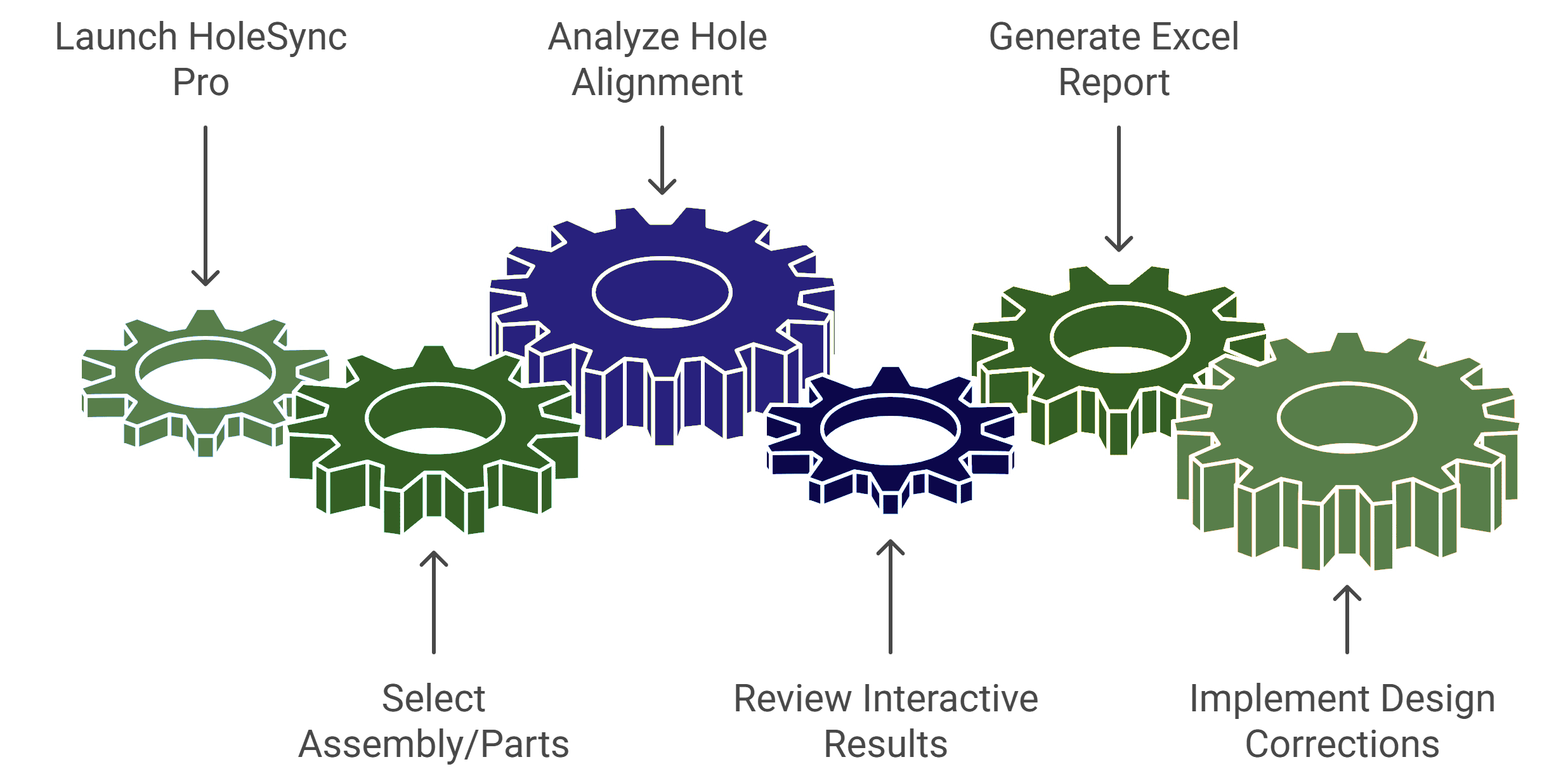
1. Run HoleSync Pro from within your CAD environment
Choose the components or assemblies you want to validate. HoleSync Pro automatically identifies relevant mating parts and prepares them for analysis, ensuring comprehensive coverage of all hole pairs in the selected geometry.
2. Select the assembly or parts to be checked
Configure drawing templates, dimensioning rules, and annotation styles.
Align with company, product, or regulatory standards for compliance and consistency.
3. Allow the tool to automatically analyze hole alignment, presence, and pairing
With a single command, HoleSync Pro scans the selected assembly to detect misaligned axes, missing holes, or incorrect hole pairings. The intelligent algorithm evaluates both native and imported geometry, providing precise validation results in seconds.
4. Review interactive results and detailed Excel reports generated by the tool
After analysis, HoleSync Pro displays clear visual indicators inside the CAD environment showing where misalignments or missing holes exist. At the same time, it generates an organized Excel report listing all issues, part references, and suggested corrective actions for quick collaboration.
5. Implement design corrections based on findings to ensure error-free manufacturing
Use the insights from the interactive display and Excel report to correct misalignments or missing holes directly within your CAD model. This ensures perfect hole pairing and alignment before manufacturing—reducing rework, delays, and quality issues downstream.
Key Advantages
Feature Modules
Automatically identifies and highlights holes in mating components where axes are not perfectly aligned, including imported geometry.
Detects any missing holes in mating hole pairs, preventing costly rework and assembly delays.
Ensures compatible hole pairs are correctly matched to design intent and manufacturing requirements.
Performs comprehensive checks automatically across entire assemblies, saving time and improving accuracy.
Generates comprehensive Excel reports documenting all findings for easier collaboration and corrective action.
Fully customizable to adapt to client design practices and company standards.
HoleSync Pro features a user-friendly setup that allows complete configuration to match your company’s design and quality standards. The setup can be tailored to your pairing rules, alignment tolerances, and reporting needs so the tool conforms to your established CAD workflows and verification practices.
🌟 Use Cases of AutoDraft Pro
- Design Teams: Quickly identify hole misalignments and missing pairs during design validation. HoleSync Pro helps designers ensure parts and assemblies are ready for production without manual checks, improving accuracy and reducing design review time.
- Manufacturing Engineers: Verify that hole alignments match production and assembly requirements before machining or fabrication begins. This prevents downstream fitment issues, rework, and delays in assembly operations.
- Quality Assurance: Automate inspection of hole alignments as part of quality verification. The detailed Excel reports generated by HoleSync Pro provide traceable documentation for audits, compliance, and supplier quality validation.
- Supplier & Vendor Collaboration: Ensure supplier-provided components meet alignment and fitment standards. HoleSync Pro checks imported geometry for hole positioning and pairing accuracy, supporting smoother integration in global supply chains.
- Project Managers & Engineering Leads: Gain complete visibility into design readiness with automated reports. HoleSync Pro accelerates approval cycles and improves communication between design, QA, and manufacturing teams—helping projects stay on schedule.
👉 Transform Your Assembly Validation with HoleSync Pro
Frequently Asked Questions (FAQs)
Which CAD platforms does HoleSync Pro support?
Can the tool handle imported geometry for hole alignment checks?
How customizable is HoleSync Pro for different company standards?
Does HoleSync Pro generate reports?
Can it analyze entire assemblies automatically?
Explore real-world Toolkit Solutions showcasing how NX CAD Tools deliver automated precision validation, streamline workflows, and enhance engineering outcomes with unmatched efficiency
HoleSync Pro
HoleSync Pro – Automated Hole Alignment and Validation Across Assemblies
HoleSync Pro is a powerful automated tool for Siemens NX, Solid Edge, and Autodesk Inventor that streamlines the complex process of hole validation in assemblies.