























AutoDraft Pro : CAD-specific 2D drawing automation engine
AutoDraft Pro is a pre-developed, CAD-specific 2D drawing automation engine purpose-built for Siemens NX, SolidWorks, and Autodesk Inventor. Each variant is deeply integrated, harnessing the full feature set and workflows of its target CAD environment. AutoDraft Pro can be configured to meet any company or product standard, accelerating drawing production while ensuring consistent quality.
Why AutoDraft Pro?
Choosing AutoDraft Pro means empowering your engineering team with a CAD-native automation engine designed for speed, flexibility, and accuracy delivering consistent, professional drawings while seamlessly adapting to evolving business and industry needs.

Deep Native CAD Integration
AutoDraft Pro is purpose-built for Siemens NX, SolidWorks, and Autodesk Inventor. It leverages the full native API and CAD-specific features, ensuring seamless and reliable drawing automation tailored to each platform.

Significant Time Savings
Automate repetitive drawing creation tasks to reduce drafting time by up to 80%. Faster generation of multi sheet, detailed, and section views frees your engineering team to focus on design and innovation.

Fully Customizable Templates & Standards
Easily configure drawing templates, dimensioning rules, annotation styles, and layouts to meet your company’s or industry’s documentation standards—guaranteeing consistent, error-free output every time.

User-Friendly, CAD-Native Interface
Designed with engineers in mind, AutoDraft Pro provides a guided, in-CAD workflow that minimizes errors and training time. The familiar UI ensures quick adoption and hassle-free operation.

Future-Proof and Scalable
Built to evolve with your needs, AutoDraft Pro adapts seamlessly to CAD software updates and growing documentation requirements, ensuring your drawing automation stays effective as your business scales.
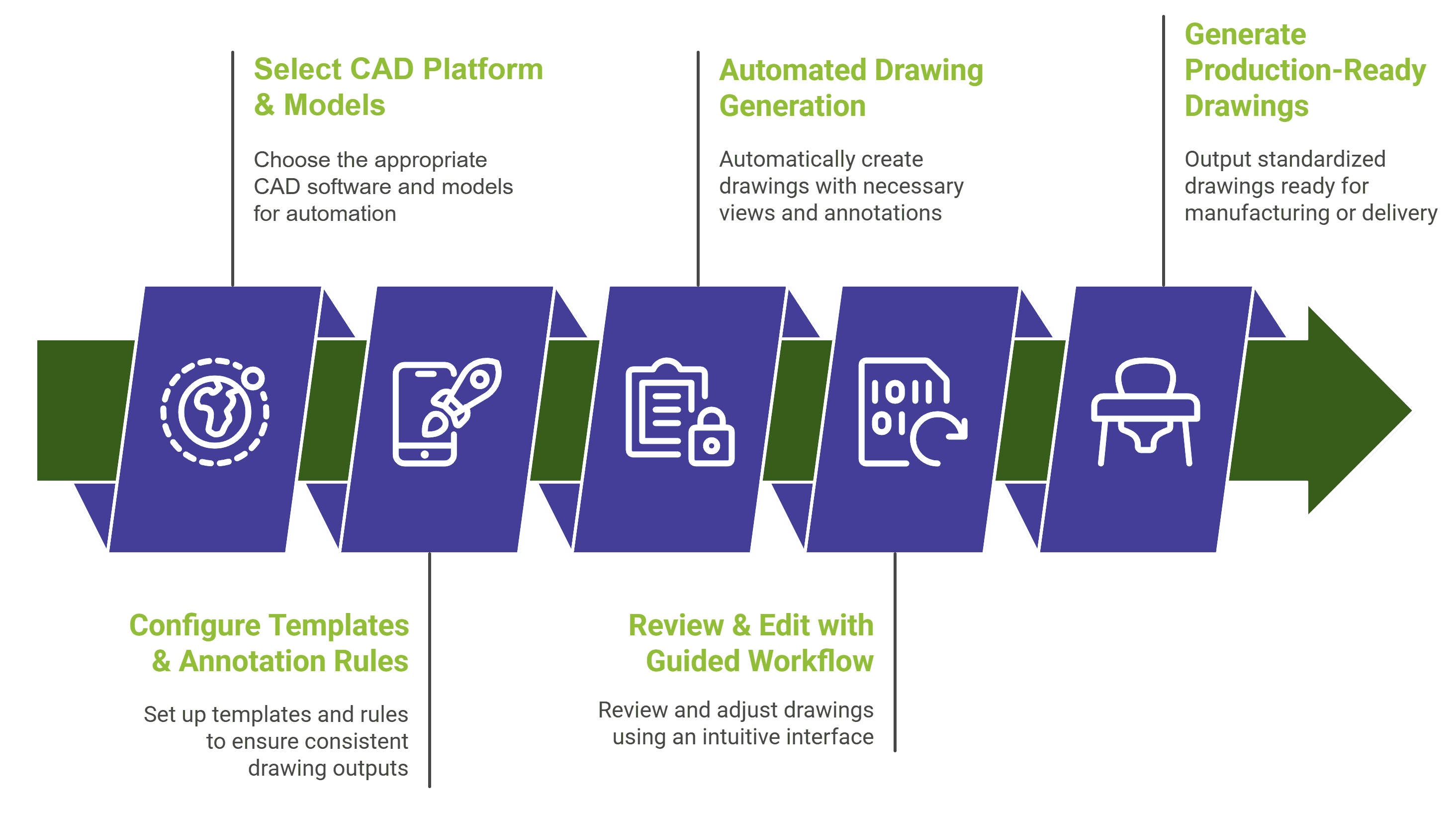
How It Works
01. CAD Environment Selection
Choose your CAD platform: Siemens NX, SolidWorks, or Autodesk Inventor.
AutoDraft Pro integrates natively with the selected CAD environment for seamless operation.
02. Template & Standards Configuration
Configure drawing templates, dimensioning rules, and annotation styles.
Align with company, product, or regulatory standards for compliance and consistency.
03. Model Input & Setup
Load 3D part or assembly models into the CAD environment.
Define required view types: multi-sheet, section, detail, or standard layouts.
04. Automated Drawing Generation
Execute AutoDraft Pro’s automation engine.
Generate 2D drawings up to 5X faster with 80% time savings compared to manual drafting.
05. Annotation & Dimensioning Automation
Apply associative dimensions, notes, and custom callouts automatically.
Maintain clarity and accuracy with rules-driven annotation logic.
06. Review & Guided Workflow
Use the CAD-native guided interface to review results.
Make quick adjustments through familiar, in-CAD workflows with minimal training needs.
07. Quality Check & Compliance Assurance
Validate generated drawings against company standards.
Ensure accuracy, consistency, and audit-ready documentation.
08. Output & Delivery
Export final drawings as production-ready deliverables.
Provide consistent documentation for manufacturing, QA, and client use.
Key Advantages
Deep Platform-Specific Integration
Boosts Productivity
Consistent Quality
Easy Adoption
Familiar CAD UI with guided workflows reduces training time.
Customizable & Scalable
Flexible to evolve with your business and CAD updates.
Feature Modules
AutoDraft Pro | NX
Accelerate 2D drawing creation for all part and assembly types in Siemens NX. Configure templates, annotation logic, and view settings to fit your company’s quality and documentation standards. Supports multi sheet, section/detail views, and standards-driven outputs with a guided user interface for easy adoption.
AutoDraft Pro | SolidWorks
AutoDraft Pro | Inventor
Different Modules of AutoDraft Pro
Feature / Capability
AutoDraft Pro (CAD-Specific)
CAD-Neutral Competitors
Deep Integration
Native integration with Siemens NX, SolidWorks, and Inventor; leverages full CAD API for seamless automation.
Often rely on generic or limited APIs with feature gaps.
Platform-Specific Performance
Optimized for platform nuances (e.g., NX sheet metal, Inventor assemblies) for faster, more accurate results.
One-size-fits-all approach may underperform on complex workflows.
User Interface Tailored to CAD
Custom UI integrated within each CAD environment for familiar, guided workflows.
External or generic interfaces that can feel disconnected.
Standards & Templates Configuration
Ability to fully customize templates, dimensioning, and annotation styles per CAD platform.
Limited customization, often basic template support.
Comprehensive Feature Support
Supports advanced CAD-specific views, multi-sheet sets, sectional/detailed views, associative dimensions, and notes.
Faster Implementation & Adoption
Uses familiar CAD workflows, requiring less training and faster adoption.
Steeper learning curve due to generic workflows.
Future-Proof & Upgradable
May lag behind CAD vendor updates, risking incompatibilities.
Customer-Specific Customization
Full customization services for industry, product, or regulatory needs on each CAD platform.
Customization options often limited or superficial.
🌟 Use Cases of AutoDraft Pro
- Design Teams: Streamline drawing creation and reduce manual drafting errors.
- Manufacturing Engineers: Quickly access production-ready, standards-compliant drawings.
- Quality Assurance: Ensure documentation accuracy for audits and compliance.
- Project Managers: Gain control over documentation timelines and deliverables.
👉 Ready to Accelerate Your Drawing Creation Process?
Frequently Asked Questions (FAQs)
What CAD platforms does AutoDraft Pro support?
Can AutoDraft Pro be customized to my company’s standards?
How does AutoDraft Pro help improve design productivity and reduce drawing time?
Is training required to use AutoDraft Pro?
Does AutoDraft Pro support multi-sheet and detailed views?
Explore real-world Toolkit Solutions showcasing how NX CAD Tools deliver automated precision validation, streamline workflows, and enhance engineering outcomes with unmatched efficiency
AutoDraft Pro
AutoDraft Pro : CAD-specific 2D drawing automation engine
AutoDraft Pro is a pre-developed, CAD-specific 2D drawing automation engine purpose-built for Siemens NX, SolidWorks, and Autodesk Inventor. Each variant is deeply integrated, harnessing the full feature set and workflows of its target CAD environment. AutoDraft Pro can be configured to meet any company or product standard, accelerating drawing production while ensuring consistent quality.